Odoo 19 · Access governance
Preview, apply, and prove every Odoo 19 access change.
Airlock helps Odoo admins see, preview, apply, and prove access changes — and it never pretends that hidden menus are database security. It scans what users can reach and changes nothing while it looks; it simulates a change before applying it; and it narrows record-level access on sensitive HR models.
It exports proof of what a person can see, and keeps an append-only, tamper-evident record for audits. It tells you, on the screen, when it is tidying the interface versus narrowing real database access, so you are never told a menu you hid is a lock it is not.
View on the Odoo App Store Ask about Airlock
USD 150, one time · Odoo 19 Community & Enterprise · OPL-1.
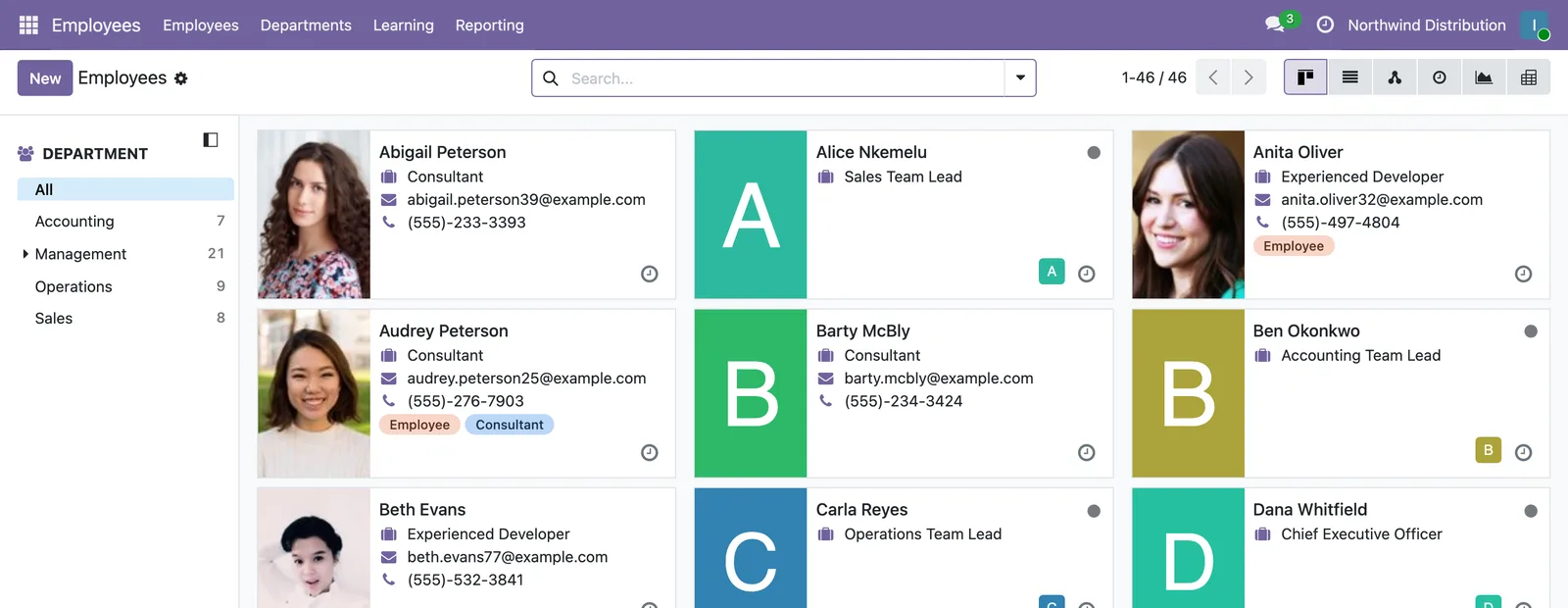
Hiding a menu is not the same as closing off access.
A field may disappear from the web or mobile interface and still remain accessible through the API, reports, or other application paths.
That distinction is easy to overlook until it matters: a contractor nearing the end of an engagement, an auditor testing permissions, or a departing employee whose access was never fully reviewed.
Interface hiding has a legitimate purpose. It keeps screens clean and removes distractions. The problem is not using it for that purpose.
The problem is calling it security.
What Airlock is
Sees what your users can see
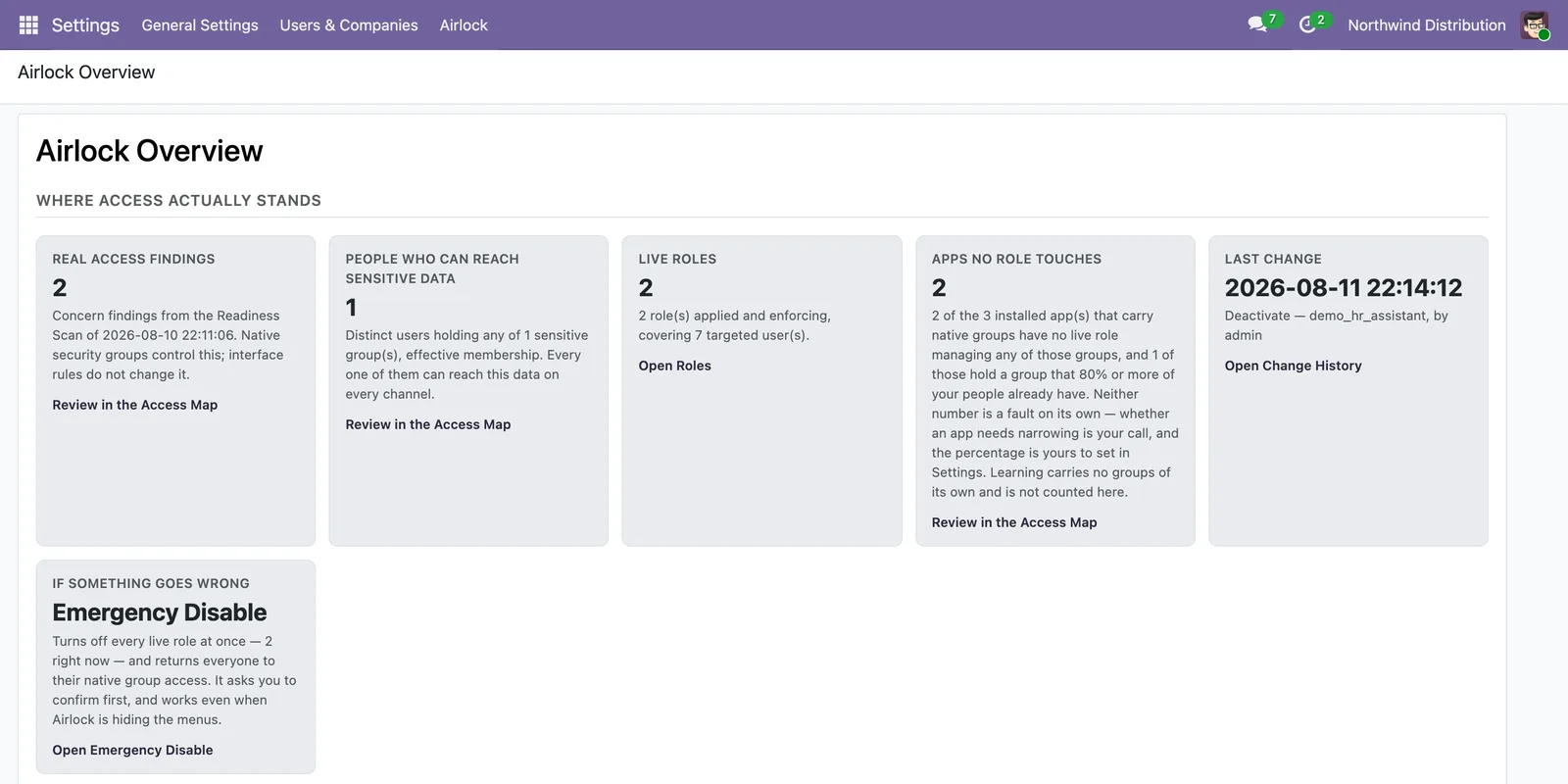
Airlock's Readiness Scan reports who can reach what, and it changes nothing while it looks.
The Overview dashboard derives every figure from records rather than editorial copy, and its readiness checklist ticks only from evidence the scan actually found.
Changes access behind a gate, never in one click
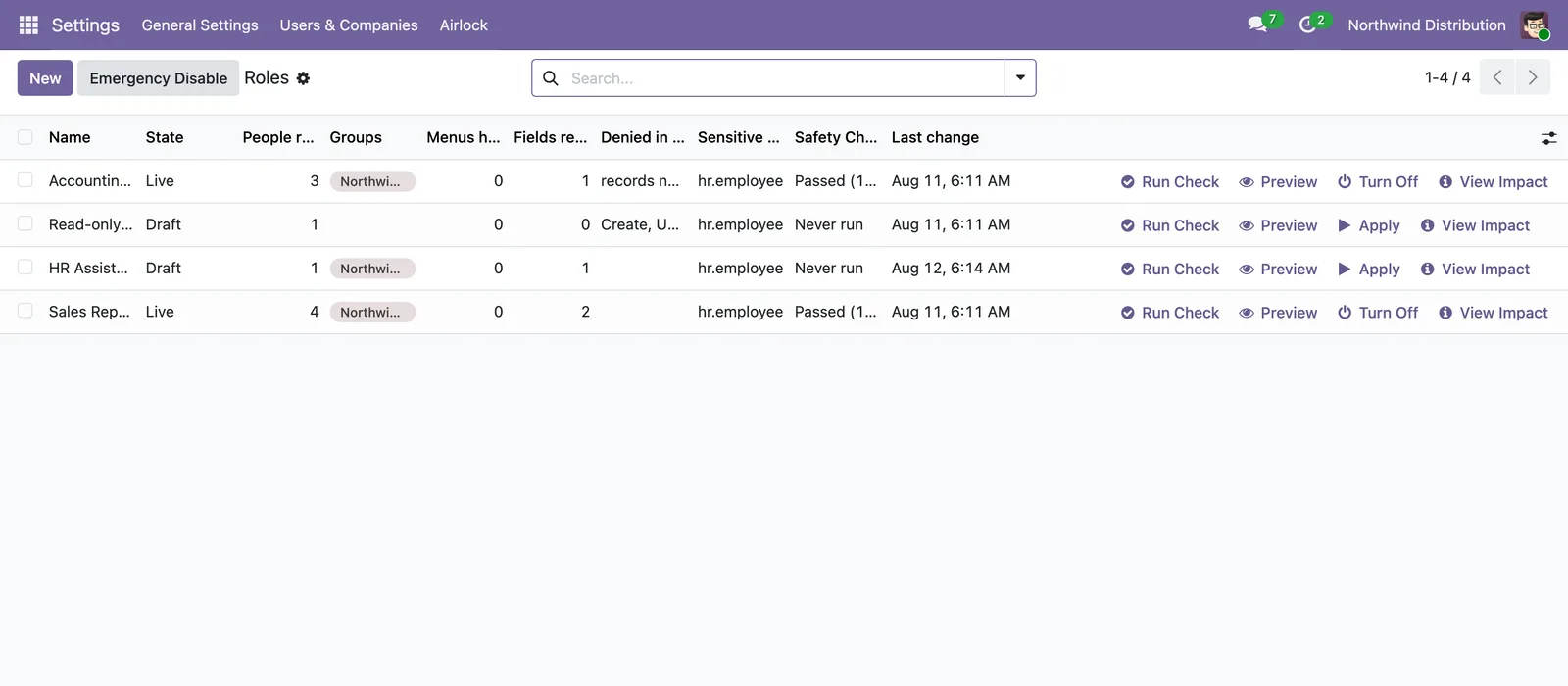
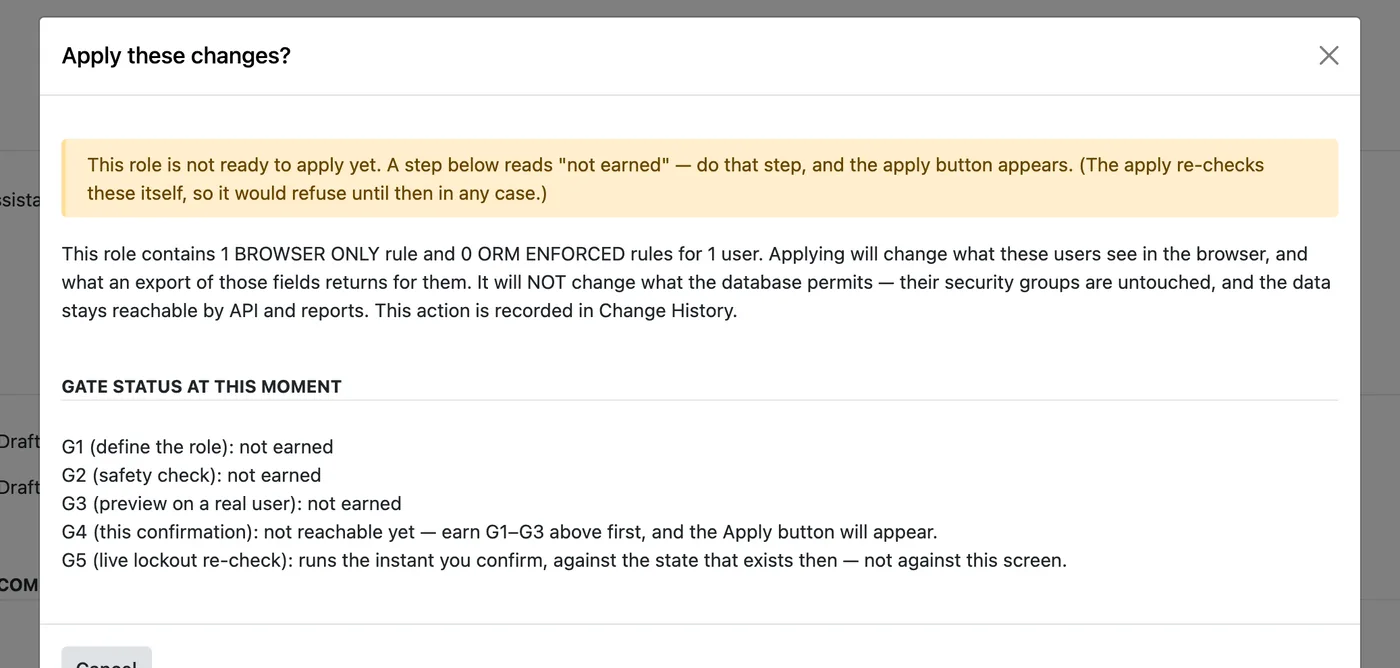
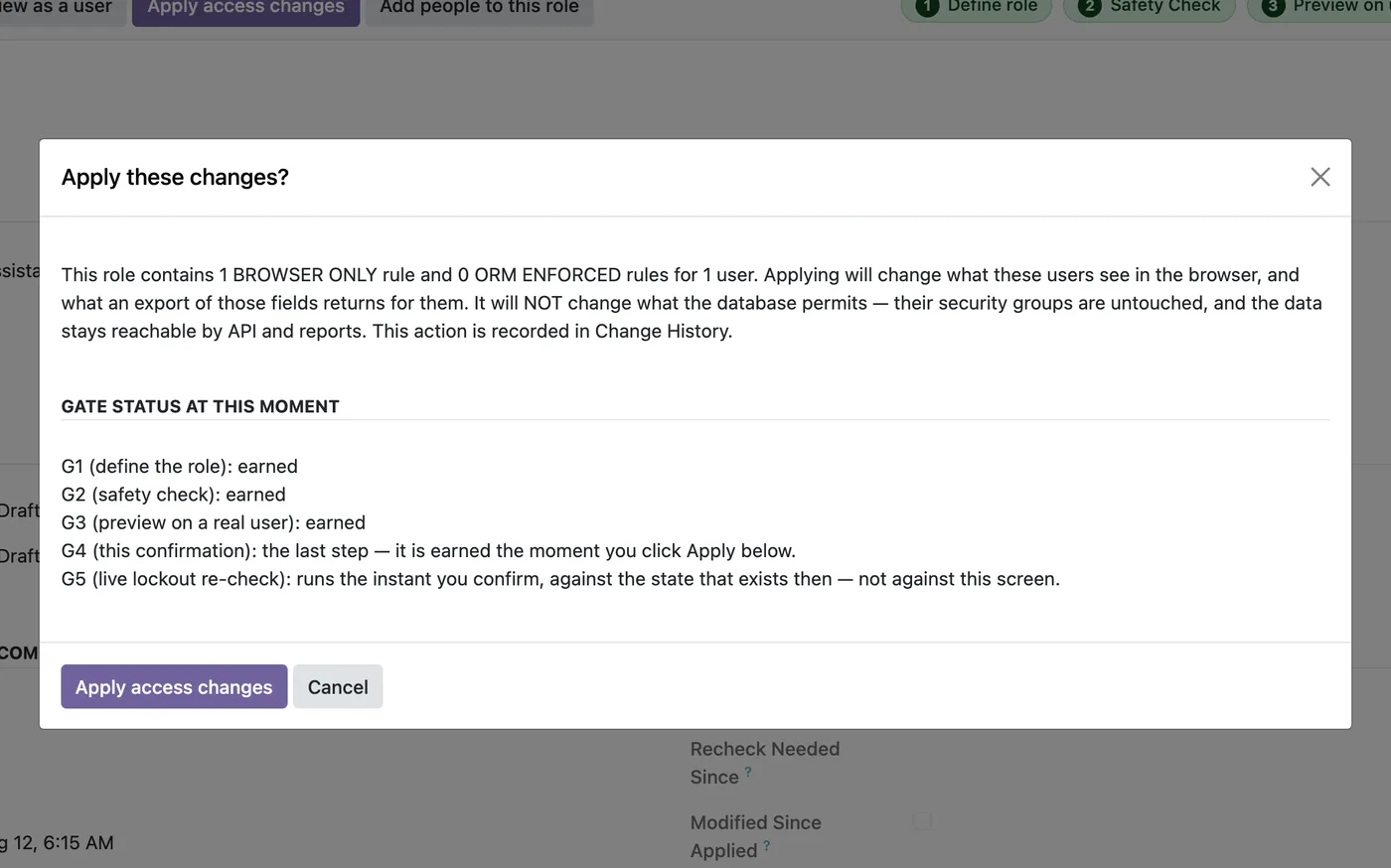
Every change travels the same path — a Safety Check simulation, a preview as the real user, then a gated apply — and a bare apply that skipped the gate is refused.
The journey only reaches apply once each step before it has earned its place.
The simulation changes nothing in the database, and the preview is witnessed — you see what the targeted user would see before anything is applied.
Two badges. They never mean the same thing.
BROWSER ONLY
BROWSER ONLY means interface hiding that is still reachable by API and reports — a tidied menu, not a lock.
The menu, field, or button disappears from the web and mobile interface, and the data stays reachable by the API, by reports, and from the phone app.
Airlock says so on the same screen where you make the change, and when you need the database to enforce something, it points you at narrowing the security group instead.
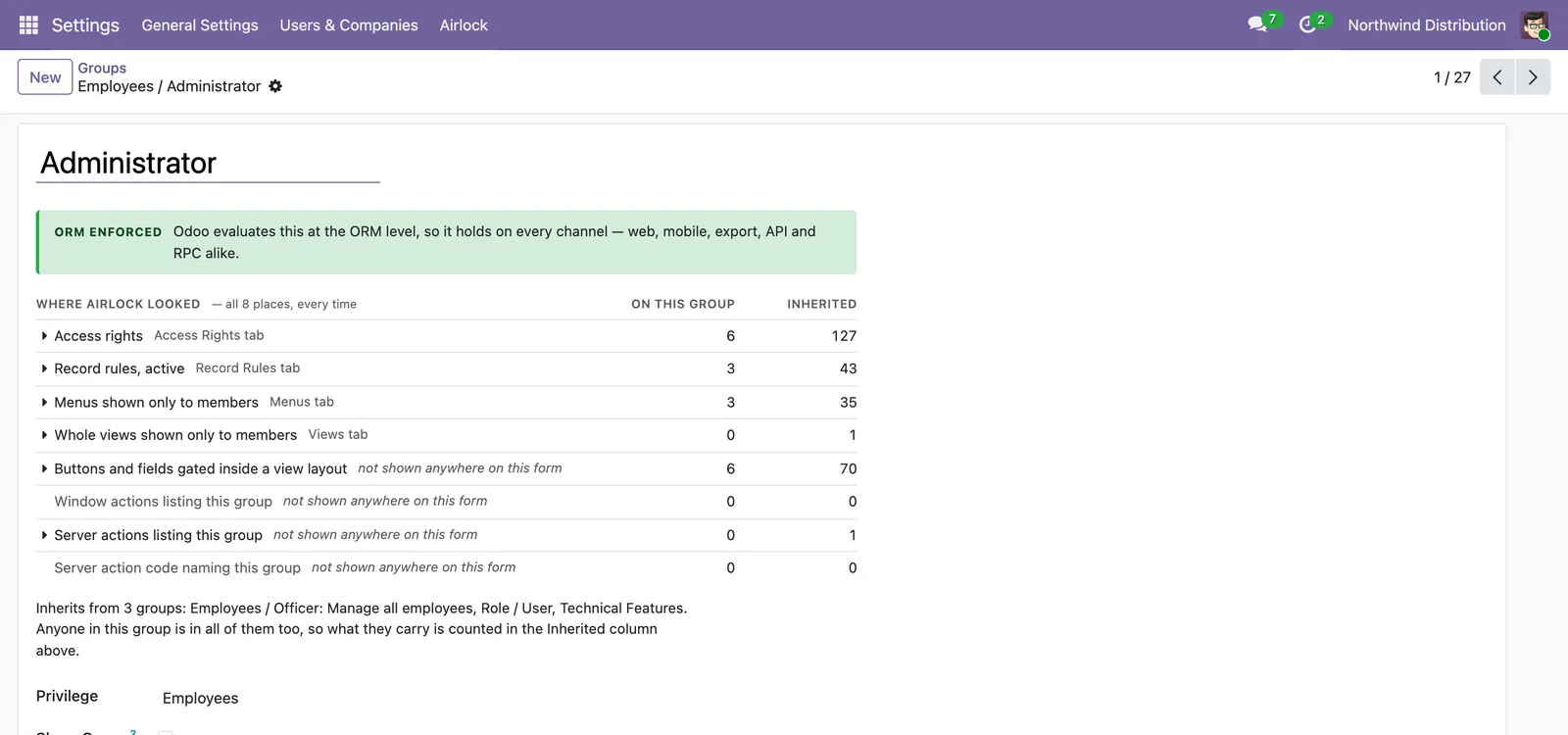
ORM ENFORCED
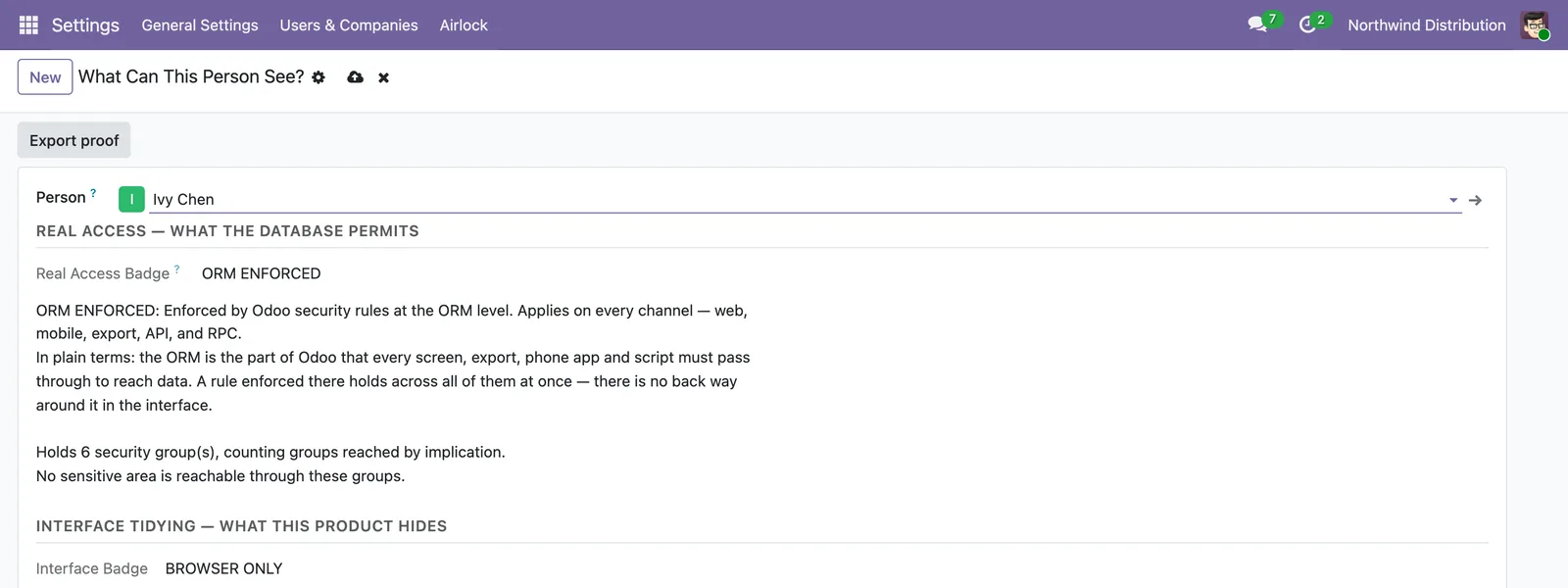
ORM ENFORCED means narrowing the database actually enforces, and the two labels never collapse onto one.
Where a screen reports the access a person holds natively, ORM ENFORCED names that native group enforcement rather than anything Airlock added.
A database-mode rule narrows what a real, non-administrator user can read through the ORM.
Every screen carries a badge computed from the mechanism itself, not from editorial copy.
Key capabilities
Access readiness scan — reports who can reach what, and changes nothing while it looks.
User-level visibility preview — see what one real user would see, before applying.
Gated apply flow — a bare apply that skipped the gate is refused.
ORM-enforced record rules on a curated set of sensitive models — hr.payslip, hr.version, hr.employee.
Browser-only UI hiding, with the caveat stated on screen and never sold as a lock.
Append-only, read-only Change History with hash-chain tamper-evidence.
Supports SOC 2 evidence collection through a signed retention archiver.
Proof export in HTML, JSON, and CSV — the screen's own computation, not a second implementation.
Upgrade enforcement-hash checks — a scope change moves a documented hash.
See it in action
1Scan what everyone can reach.
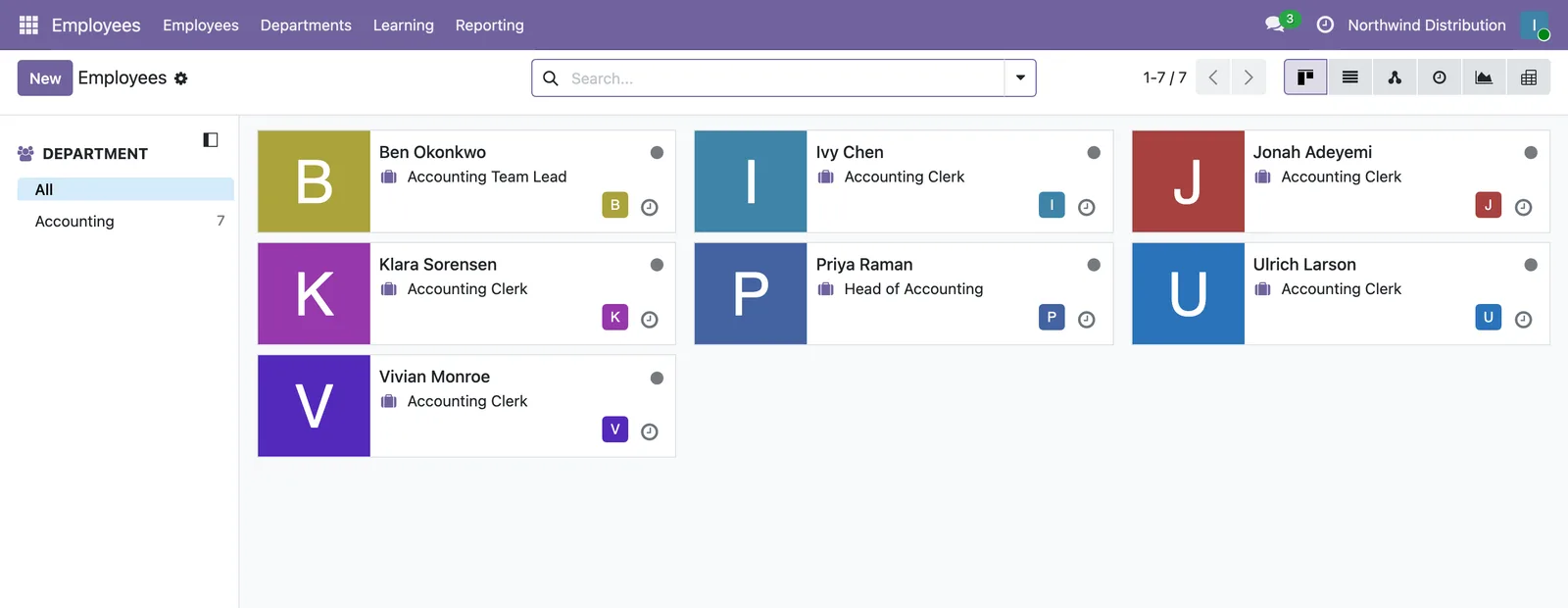
Run the Security Readiness Scan, or open “What Can This Person See?” for one user; every figure is computed live and looking changes nothing.
2Preview the change as the real user.
Draft a role, run the Safety Check simulation, then preview exactly what the targeted user would see before anything is applied.
3Apply behind the gate.
A bare apply that skipped the gate is refused, and the confirmation states whether the change is BROWSER ONLY or ORM ENFORCED.
4Prove what moved.
Export the “What Can This Person See?” artifact in HTML, JSON, and CSV, and read the append-only Change History entry the apply wrote.
What's inside after install
Installing changes nobody's access on its own.
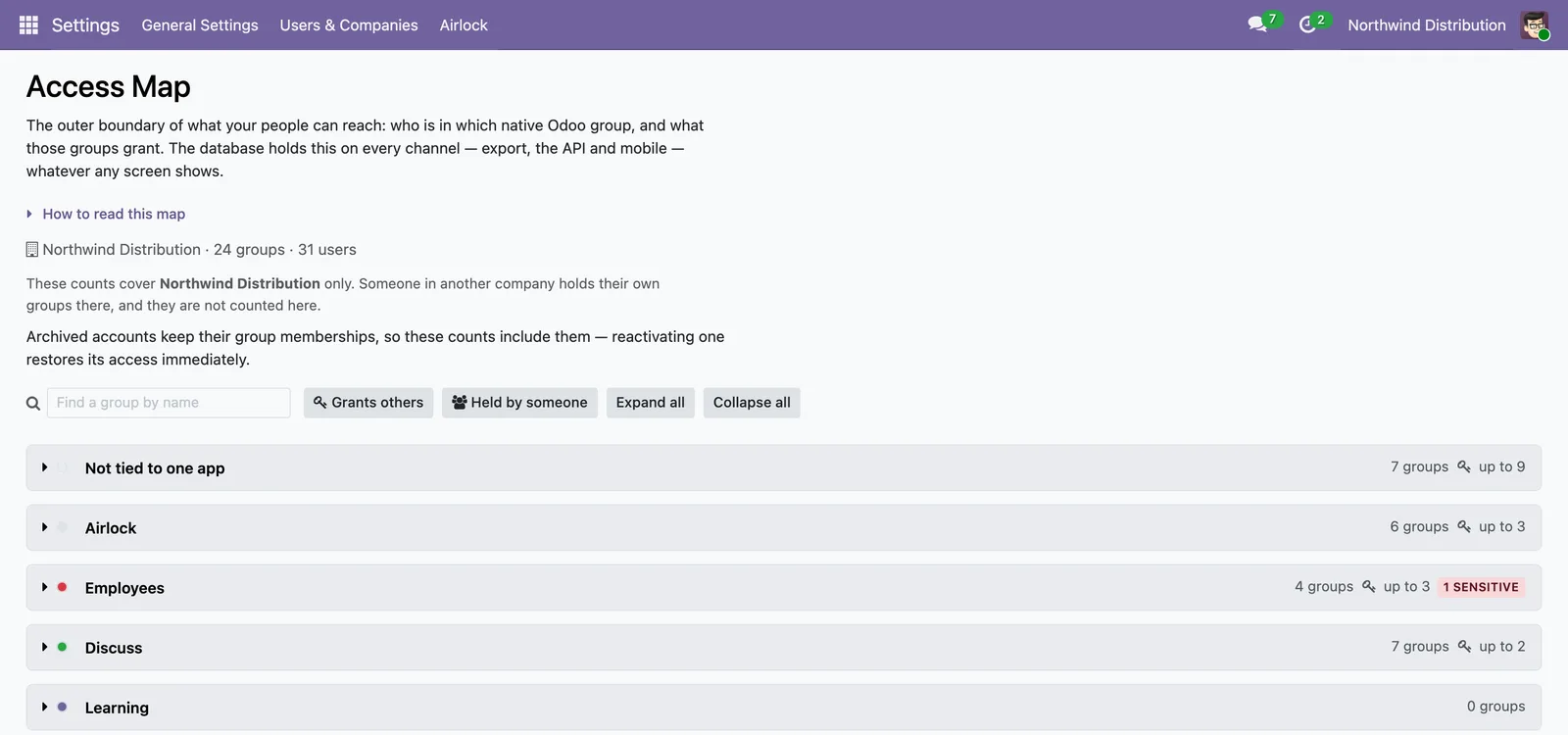
A new Airlock menu appears with:
Evidence that survives the argument.
Change History is append-only and read-only at the application layer, with hash-chain tamper-evidence. The audit trail supports SOC 2 evidence collection through a signed retention archiver that leaves a verifiable record. Its export archives are verifiable: each carries a manifest with the chain boundary and a per-file checksum, so tampering with an exported archive is detectable.
And the evidence survives the module itself — uninstall writes the ledger out to an attachment, with a manifest matching the live chain, before the tables are dropped.
From the “What Can This Person See?” screen you can export a proof artifact — the screen's own computation rendered to HTML, JSON, and CSV, never a second implementation. The artifact carries the interface-versus-database caveats verbatim, so it cannot outlive the honesty the screen enforces.
What it records is Airlock's own governance events — role changes, gate stamps, applies and teardowns. It does not record edits to your business records or native group changes made outside Airlock. Odoo's own chatter and logs carry those.
Worth knowing before you buy, not after.
What it does
- Airlock's Readiness Scan reports who can reach what, and it changes nothing while it looks.
- Every change travels the same path — a Safety Check simulation, a preview as the real user, then a gated apply — and a bare apply that skipped the gate is refused.
- The simulation changes nothing in the database, and the preview is witnessed — you see what the targeted user would see before anything is applied.
- For the models where it matters, Airlock narrows real database access, on a declared curated set —
hr.payslip,hr.version,hr.employee. - Each generated rule's scope is verified against the grants actually in force, and the verdict is falsifiable rather than decorative.
- A database-mode rule narrows what a real, non-administrator user can read through the ORM, and a generated rule is never global — it binds to the role's own group.
- Salary fields are guarded by group.
- Change History is append-only and read-only at the application layer, with hash-chain tamper-evidence.
- The audit trail supports SOC 2 evidence collection through a signed retention archiver that leaves a verifiable record.
- From the “What Can This Person See?” screen you can export a proof artifact — the screen's own computation rendered to HTML, JSON, and CSV, never a second implementation.
- An upgrade never silently changes what your roles enforce: any change to the enforced set moves a documented effective-permission hash, so a silent scope change is not possible.
- Airlock adds under 5% query overhead, measured on a 500-user reference fixture.
What it does not do
- Hiding is not security, and Airlock says so on screen. A
BROWSER ONLYfield disappears from the web and mobile interface, but it stays reachable by API and reports. When you need real enforcement, Airlock points you to narrow the security group instead. - Record-level rules on a small, fixed set of sensitive models. At the database layer Airlock narrows which records a role can see, and it checks each rule against the groups actually in force, so you can prove what it does. It does not hide individual fields at the database, and it adds no blanket DENY rules. That was left out on purpose, because a smaller enforced surface is one you can actually verify.
- It narrows, never denies: a person who also holds another granting group still sees the wider set.
- Administrators are never filtered by a profile, on any surface.
- Four of the five starter role templates ship zero rules by design, and the gallery says so. The first rule is your own, aimed at your own menus.
- Two things outlive a role's end date. Field and button rules stop at the end date. Menu-hidden and record-rule artifacts are stored rows that Odoo keeps evaluating on its own, so they stay in force until the role is turned off, and the role stays live until then.
- Three limits hold on this plane, and they are stated here rather than hidden. Code running as superuser (
sudo()) is unaffected by a record rule, as with every Odoo access mechanism. A few core models answer a denied read from a public sibling: Odoo'shr.employeefalls back tohr.employee.publicfor search and for any field that sibling also carries, so only natively group-guarded fields such asprivate_emailstay denied. And raw SQL bypasses every Odoo access rule, this plane included. - It is not a compliance guarantee. Airlock reports, simulates, applies and records. Deciding what your organisation's access ought to be is still your job, and no software makes an employer compliant by itself.
Before you buy, check three things.
Odoo.sh or on-premise — not Odoo Online.
Odoo Online (SaaS) does not allow installing code modules, so Airlock cannot run there. This is the most common reason a purchase is wrong, so confirm it first.
Odoo 19. Airlock works inside your Odoo 19 database and reaches nothing outside it. It will not carry a configuration from one Odoo version to the next on its own, so nothing changes across an upgrade that you did not review.
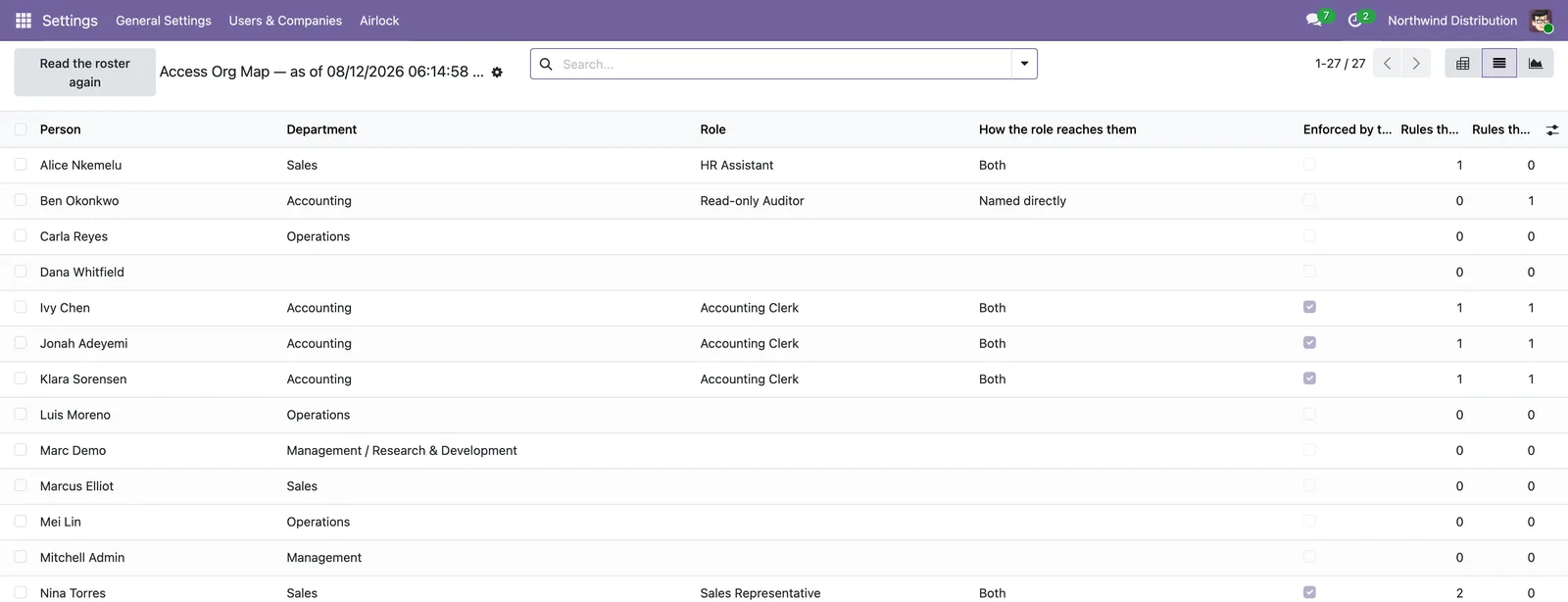
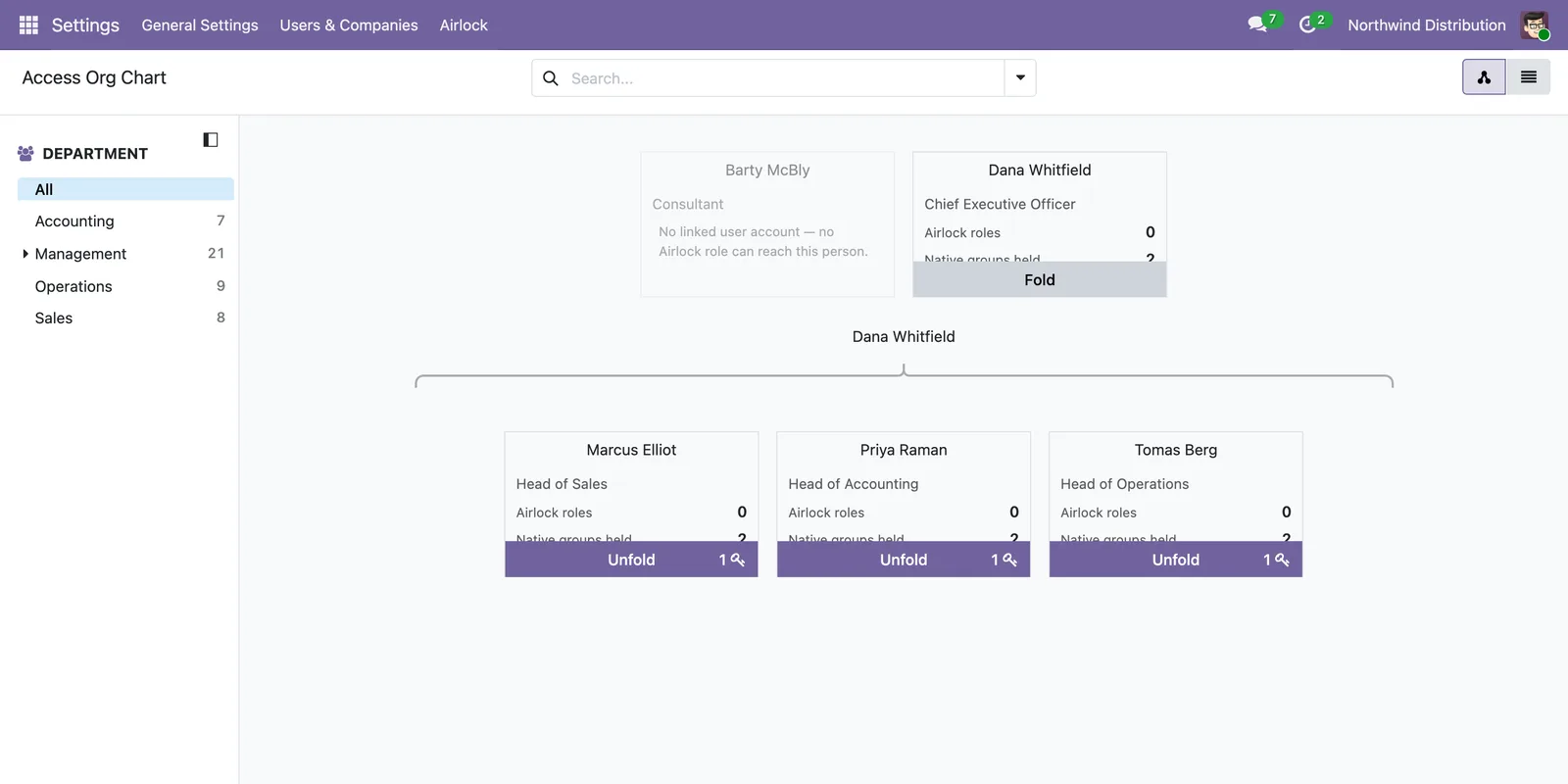
Community or Enterprise. Both. Airlock depends on five Odoo modules — base, web, mail, hr and web_hierarchy. Every one of them ships with Community, so installing Airlock pulls in whatever your database does not already have. hr is what the Access Org Map and Access Org Chart read the reporting chain from; web_hierarchy is the module that registers the hierarchy view type the org chart is drawn as, and Airlock declares it rather than assuming it is present.
| Release | Version 19.0.1.5.0, first published in August 2026. |
|---|---|
| Hosting | Odoo 19 Community and Enterprise, on Odoo.sh or on-premise. Not available on Odoo Online (SaaS), which does not allow installing code modules. |
| License | Odoo Proprietary License v1.0 (OPL-1). Airlock is a paid app; the license governs use and redistribution. |
| Support | Email info@sirkodington.com for installation, configuration, and bug fixes on the Odoo 19 line, answered on a best-effort basis. Provided as-is under the OPL-1 license; no service-level guarantee or custom development is included. |
| Updates | Bug fixes on the Odoo 19 line as needed, occasional feature updates, and a dedicated release for each new Odoo major version. |
An upgrade never silently changes what your roles enforce: any change to the enforced set moves a documented effective-permission hash, so a silent scope change is not possible. Unchanged enforcement reads byte-identical across the upgrade.
USD 150, one time, for Odoo 19.
Airlock at a glance
| What it is | An access-governance app for Odoo 19. It shows who can reach what, previews a change as the real user, applies it behind a gate, and keeps an append-only record of what was applied. |
|---|---|
| Odoo module | airlock_access, version 19.0.1.5.0, first published in August 2026. |
| Price | USD 150, one time, for the Odoo 19 line. |
| License | Odoo Proprietary License v1.0 (OPL-1). |
| Editions | Odoo 19 Community and Enterprise, both. |
| Hosting | Odoo.sh or on-premise. Not Odoo Online (SaaS), which does not allow installing code modules. |
| Depends on | Five modules that all ship with Community: base, web, mail, hr, web_hierarchy. |
| Two modes | A BROWSER ONLY rule changes what the Odoo web interface draws, and nothing else. An ORM ENFORCED rule applies on every channel: web, mobile, export, API and RPC. |
| Enforced at the database | A declared, curated set: hr.payslip, hr.version and hr.employee, at the record level. |
| Support | Email info@sirkodington.com, answered on a best-effort basis. Provided as-is under OPL-1. |
One payment, for the Odoo 19 line. Bug fixes on that line as needed, occasional feature updates, and a dedicated release for each new Odoo major version.
Support is email, at info@sirkodington.com — installation, configuration and bug fixes, answered on a best-effort basis. Provided as-is under OPL-1: no service-level guarantee, and no custom development.
View on the Odoo App Store Ask about Airlock
USD 150, one time · Odoo 19 Community & Enterprise · OPL-1 · Version 19.0.1.5.0.
Frequently asked
Can Airlock lock an administrator out?
No. Administrators are never filtered by any profile, on any surface. The exemption is resolved live on every call rather than read from a cache, so it cannot go stale.
What is the difference between ORM ENFORCED and BROWSER ONLY?
An ORM ENFORCED rule applies on every channel: web, mobile, export, API, and RPC. A BROWSER ONLY rule changes only what the Odoo screens draw, and nothing beyond the interface.
Which models can it enforce at the database?
A declared, curated set of sensitive models: hr.payslip, hr.version, and hr.employee, at the record level. It narrows which records a role sees; it does not hide individual fields or add DENY rules at the database.
Is it safe to run the scan and previews on a live database?
Yes. The Readiness Scan and the previews only read; they write nothing. No change is saved until you pass the gate and confirm it.
What happens to my audit trail if I uninstall?
It is written out to an attachment first, with a manifest that matches the live hash chain, before the tables are dropped. The evidence survives the module itself.
Do I need Enterprise, or does it work on Community?
It works on both Community and Enterprise, on Odoo 19.
Will Airlock slow down my Odoo?
In testing it added under 5% query overhead, measured on a 500-user reference fixture.